Work & Productivity·March 31, 2026
200 Resumes. One Hour. The Recruiter's Playbook.
TL;DR
200 resumes. One hour before the hiring-manager intake. Here's the responsible playbook for recruiters to surface signal — without offloading the decision.
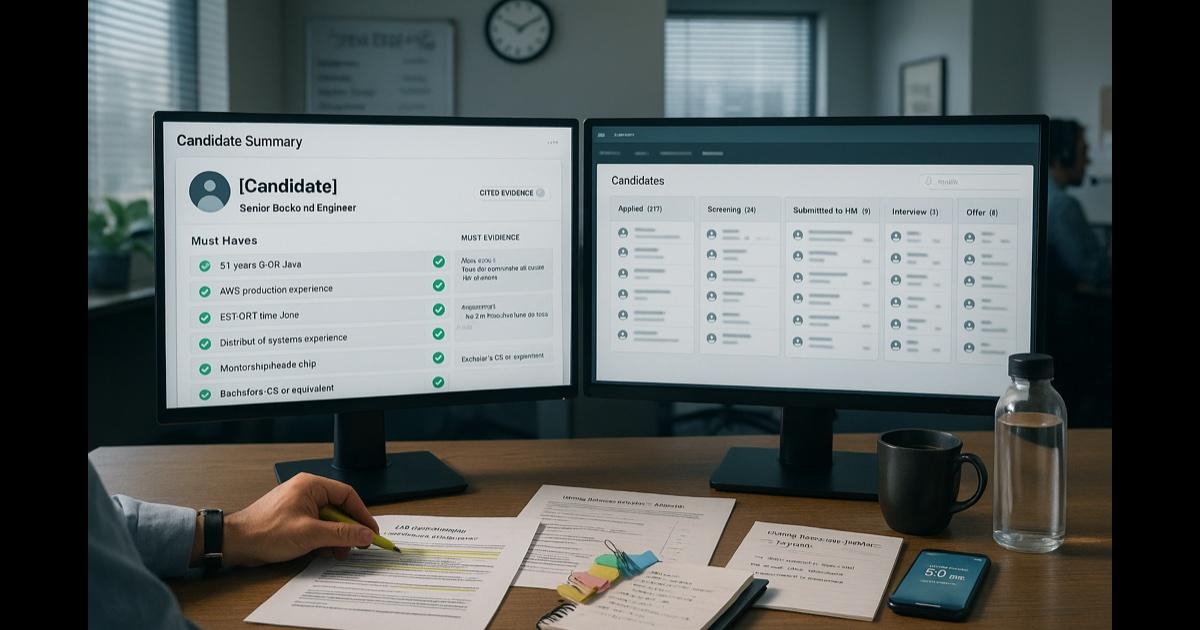
It's 9:08 AM. Your hiring manager intake call is at 10:00. You opened the ATS expecting maybe 40 applicants for the Senior Backend Engineer role. There are 217. The post has been live for 36 hours.
The JD has six must-haves and forty-three nice-to-haves, half of which were added by the hiring manager last week in a flurry of "oh, and ideally..." Slack messages. The scorecard is a Google Doc that has been edited by four people and has a comment thread you have not read.
You have not yet looked at a single resume. The hiring manager is going to walk into the call asking "so, what does the pipeline look like?" — which means in the next 52 minutes you need to: skim 217 resumes, generate a sense of who's actually qualified, identify the top 8-10 to discuss in the intake, and prep an agenda for a productive intake instead of a vibes session.
Every recruiter has had this Wednesday. The math of recruiting — too many applicants, too little time, too few signals on a one-page resume — is brutal. The temptation to offload it to an algorithm is strong.
Here is what actually works, including the part where you don't offload the hiring decision to an algorithm.
First: the line you don't cross
Stop. Before any tactic.
AI is a productivity tool for the parts of recruiting that involve reading, summarizing, drafting, and prepping. It is not a hiring decision system. Do not use any tool — CorpGPT included — to:
- Auto-reject candidates based on a model score.
- Rank candidates with a "fit score" you take at face value.
- Filter resumes based on inferred demographic signals.
- Make any candidate decision without a human reading the underlying resume.
That's not just ethics. It's a growing list of legal requirements — NYC AEDT, Illinois AIVI, the EU AI Act, parts of the EEOC's emerging guidance — that hold employers accountable for automated decisions. And, more practically: the algorithm doesn't know what the role actually needs. You do, after the intake call. The hiring manager does, after the loop.
The tool's job is to summarize, search, and draft. The judgment is yours. Always.
With that in mind, here is what actually works.
The move: summarize the stack, then judge it
The mistake most recruiters make in 217-applicant queues is one of two extremes. Either they read 30 resumes carefully, get tired, and make worse and worse skim-decisions on the back half. Or they keyword-search for buzzwords and miss the candidates whose resumes are written in different language but match the spirit of the role.
Stop reading and stop keyword-searching. Get a structured, cited summary of each resume against your JD's must-haves. Then you read the summaries, you pick the shortlist, and you spend the time on the calls.
The playbook
9:08 AM. Upload the JD and resumes (3 min)
Open CorpGPT. Drop in:
- The JD, with the must-haves explicitly called out (e.g., "must-have: 5+ years backend in Go OR Java; must-have: AWS production experience; must-have: located in EST/CST time zone").
- The scorecard (interview rubric).
- Any prior calibration notes from similar roles your team has hired.
- The resumes themselves — bulk-export from your ATS as PDFs into a Knowledge Base folder for the role.
Three minutes. The whole pile is in one searchable place.
9:11 AM. Generate the intake prep first (10 min)
Before you touch a single resume, prep for the intake. Open Knowledge Studio. Generate:
- An intake call agenda based on the JD — discovery questions, calibration questions ("show me a profile you'd say yes to and one you'd say no to and tell me why"), sourcing strategy questions, timeline expectations.
- A must-have refinement worksheet — six must-haves with the open question "which of these are truly disqualifying vs. nice-to-have?" One of the goals of the intake is to actually get to six real must-haves, not "a list everyone signed off on without reading."
Ten minutes. You're now going to walk into the intake leading the conversation, not reacting to it.
9:21 AM. Skim the pile with help (25 min)
Now the resumes. Open the Digital Assistant (Nova) against the resume Knowledge Base — you can ask questions across every resume PDF at once instead of opening them one by one. Ask:
- "For each resume in this folder, summarize the candidate's most relevant experience against the JD's six must-haves. Cite the specific lines on the resume where the experience is mentioned. If a must-have is not addressed, say 'not addressed in resume.'"
You get a structured set of summaries — name, must-have-by-must-have evidence with citations, gaps. Critically, you don't get a ranking, a score, or a recommendation. You get a research summary.
Now you read the summaries. The cited evidence makes it fast — you can verify any summary back to the resume in seconds. You make the shortlist. You do not delegate that to a model.
For the intake, generate one-pagers for the top 8-10 you want to discuss with the hiring manager. Knowledge Studio produces a clean candidate one-pager per resume — relevant experience, gaps to probe, projects worth a follow-up question.
9:46 AM. Final intake prep (10 min)
You now have:
- An intake agenda.
- A must-have-refinement worksheet.
- 8-10 candidate one-pagers, each cited.
- Specific calibration data from the actual pipeline ("here are three profiles that are clearly strong on must-haves 1-3 but lighter on 4-6 — is that a yes or a no for you?").
This intake is going to be different. Instead of "so, what does the role look like?" you're going to walk in with three real candidates and force a calibrating decision. The hiring manager leaves the call knowing what they actually want, because they had to react to specific people.
10:00 AM. Call
Hiring manager: "So, what does the pipeline look like?"
You: "I've got 217 applicants from 36 hours of posting. I pulled the 10 most relevant — let me walk you through three of them, see what you think, and then we'll firm up the must-haves."
Twenty minutes later, the must-haves are clearer than they've been all month. You go back to the desk with directional clarity, not vibes.
Beyond the one role: the recruiter's library
Build a per-role Knowledge Base
Every active req gets its own folder: JD, scorecard, intake notes, sourcing strategy, calibration sessions, recorded screening calls (with consent). Six weeks in, when you onboard a co-recruiter or take leave, anyone can step into the role from the folder.
Use Live Recording for screening calls (with consent)
Tell candidates at the top of the call: "I record screening calls so I can focus on the conversation instead of taking notes — is that okay with you?" Most say yes. CorpGPT transcribes. After the call, Knowledge Studio drafts a structured screening-call summary against the scorecard. You spend zero time after the call writing notes.
Use My Tutor to ramp on a new function
Staffed on a sales-engineering role and you've never recruited one before? Drop two role-specific articles, an SE leveling guide, and three top-of-funnel candidate profiles into a Knowledge Base. Run a 20-minute My Tutor session. You walk into your first sourcing session knowing the difference between a true SE and a "demo engineer" — without having to bug the hiring manager three times.
Generate outreach drafts, not outreach spam
Knowledge Studio drafts outreach messages tailored to a candidate's background and the role's pitch — three-sentence opener, one-line value prop, one specific reason this candidate. You edit, personalize, send. Faster than blank-page sourcing. Less robotic than templated InMail. Always your voice on the final send.
The features doing the work
Digital Assistant (Nova) — structured summaries of resumes against your JD's must-haves, with citations to the exact resume lines. Research, not ranking.
Knowledge Studio — intake agendas, candidate one-pagers, screening-call summaries, outreach drafts, scorecards. Each output under 60 seconds, grounded in the documents you uploaded.
Intelligent Search — find any prior candidate, intake note, or sourcing memo across your library by intent.
My Tutor — fast ramp on a new function or a new technical area before a hiring manager intake.
Live Recording — consented screening-call transcription. The structured summary writes itself; you focus on the conversation.
Why this actually works
Three forces are doing the real work.
First, recruiting is mostly reading and writing. The reading — resumes, JDs, calibration notes, scorecards — eats your morning. The writing — one-pagers, screening summaries, outreach, intake prep — eats your afternoon. Both can be drafted in seconds with citations. What's left is the part of the job that actually requires you: the conversations, the judgment, the relationships, the sell.
Second, citations make summaries auditable. When a candidate one-pager says "5+ years Go experience" and links to the exact line on the resume, the hiring manager trusts it. When it says "5+ years Go experience" with no source, the hiring manager re-reads the resume themselves, which defeats the point.
Third, the line between summarization and decision-making stays clear. The tool reports. The recruiter decides. That's defensible — to the candidate, the hiring manager, the legal team, and the regulator.
What this can't do — and shouldn't
Be honest about this. Recruiting is one of the highest-stakes places to misuse AI.
CorpGPT does not make hiring decisions. It does not score candidates. It does not auto-reject. It does not infer demographics. It does not predict who will succeed in a role. Anyone selling you a tool that does any of these things is selling you a lawsuit.
What it does is the reading, the summarizing, the drafting, and the prep. The grunt work. The interviewer judgment, the cultural read, the close, the offer negotiation, the candidate experience — that's still you. The hiring decision is yours and the hiring team's, with the recruiter accountable for the process and the hiring manager accountable for the call.
Document the process. Use the tool consistently across candidates. Train your team. Stay current on jurisdictional requirements. Talk to your employment counsel before any workflow change involving AI and candidates.
The bottom line
200 resumes. One role. Hiring manager call in an hour. Good luck — and you'll need less of it.
Summaries written. One-pagers ready. Intake agenda drafted. Calibration questions prepped. Time saved goes back into the conversations only you can have.
Find the needle. Run the loop. Hit the quota. The wizard is the recruiter doing the human parts of the job at full attention, because the reading-and-writing parts finally fit in a morning.
Open CorpGPT. Upload the JD and the pile. Walk into the intake.
Keep reading
- Answer Once. Help Forever. — how HR managers turn the handbook into a self-serve, cited-answer assistant and finally take a lunch break.
- Another Meeting to Recap the Last Meeting — how project managers record meetings and ship the summary, decisions, and action items in two minutes.
- Client Deck Tomorrow. It's 8 PM. — how consultants synthesize four reports into a draft deck and pressure-test the story before midnight.
- It's 9 PM and You're Not a Lawyer — how small business owners review vendor contracts, catch red flags, and sign smart without a legal team.
- 200-Page Contract at 4:45 on a Friday — how lawyers catch every trap in a weekend ambush and still make it to dinner.
- Tax Code Changed. Again. — how accountants translate new tax rules into client-ready answers with citations in seconds.
- Two Minutes Before the Client Call — how financial advisors sound sharp on every unscheduled portfolio call with cited research.
- Claim Denied. Find the Clause. — how insurance agents pinpoint the exact exclusion in an 80-page policy.
- Ten Minutes Between Sessions — how therapists keep their clinical library, CE, and psychoeducation handouts one prompt away.
- Beat the Binder: The Nurse's 12-Hour Shift Playbook — how nurses turn hospital formularies into instant cited answers at the bedside.
- Doctors: Stop Charting After Hours — how physicians finish documentation before lunch instead of after dinner.
- Answer 'Will I Qualify?' in Seconds — how mortgage brokers answer clients on the first call.
- Turn One Chapter Into a Week of Lessons — how teachers build a full week of materials from a single source chapter in one evening.
- Your Client Wants 30 Listings by Saturday — how real estate agents review 30 disclosure PDFs in one afternoon.
- Cram 400 Pages Before Morning — the student version of the same playbook.
- How Are You Different From [Competitor]? — how sales reps get instant cited battlecard answers mid-call and do the follow-up in five minutes.
- Brand Says Bold. Legal Says Careful. — how marketing managers ship campaigns on time with brand and legal both signed off.
- Seventeen Transcripts. One Deadline. — how writers turn a pile of interview transcripts into themes, pulled quotes, and a working outline.
- Ninety-Minute Interview. Show Notes by Tuesday. — how indie podcasters ship the entire post-production package from one upload.
- Sixty Videos In. Did I Already Post This? — how content creators turn their back catalog into a searchable content brain.
- Sixty Papers. One Lit Review. One Weekend. — how researchers turn a stack of PDFs into summaries, themes, citations, and gaps.
- Three Investor Meetings. Three Different Decks. — how founders tailor a pitch per investor.
- 47-Page Brief. Proposal Due Friday. — how freelancers turn dense briefs into proposals in hours.
- Your Kid Just Asked About Algebra. — how parents help with homework using the actual textbook.
- Medicare Sent a Letter. 12 Pages. Tiny Font. — how older adults turn any letter into a plain-English one-pager.
- See all use cases — recruiters, HR managers, project managers, consultants, small business owners, therapists, nurses, doctors, insurance agents, advisors, accountants, lawyers, brokers, agents, teachers, students, and more.
- Plans & pricing — free tier included, no credit card required.